Domestic IT Outsourcing – Why keep it domestic?


In our previous post on this series, we answered many of the common questions about what domestic IT outsourcing is. Now we’re going to have a look at how domestic IT outsourcing addresses many of the issues encountered when outsourcing IT projects to foreign countries. Though it is inexpensive to hire contractors in countries like India, China and Malaysia, the logistics of managing such a relationship often results in hidden costs that are not present in domestic IT outsourcing.

Legal issues
First, and perhaps most importantly, dealing with contractors in foreign countries is inherently risky due to the lack of legal jurisdiction. Though both parties may sign contracts and agreements explicitly protecting each others rights, each country has it’s own rules for how the terms of these agreements should be interpreted and enforced. Add to this the potential misunderstanding of the agreement due to language barriers (see below), and what essentially results is a document that represent a gentleman’s handshake… nothing more. If a company feels they have been wronged or that the contractor violated the agreement, options for legal recourse are severely limited when dealing with contractors in foreign countries.

Language barriers
As demonstrated above, when dealing with contractors who do not speak the native language of the company, the project and its associated communications are at risk of being misunderstood or misrepresented. Companies that outsource to contractors in other countries that speak their same language are not as impacted by this, but there are cultural nuances to language that might still be misunderstood. Keeping IT projects within a company’s own country will provide peace of mind that the company can effectively communicate detailed and complex project specifications without confusion stemming from language barriers.

Currency conversions
The world is getting smaller, digital currencies abound, and the task of computing currency exchanges within a constantly fluctuating monetary exchange system is largely handled automatically. However, issues still persist when moving money from one currency into the next. First of all, whatever currency exchange service is utilized, there will almost certainly be a fee taken by the bank for the service of performing the exchange. If a company pays this fee, it’s less money that could be spent paying a contractor for IT services. If a contractors pay this fee, the company is effectively paying less than full price for contractors and thus not receiving the higher quality (higher paid) contractor that would be receive by keeping contractors domestic. Additionally, when speaking with a contractor, confusion will arise over invoices and the amounts in various currencies. Even if one currency is selected for discussion purposes, the party who is more familiar with the other currency will find it difficult to do the conversion and follow the conversation at the same time. One other issue is the time it takes to send/receive money in other currencies. This delay could stall projects unnecessarily.

Time zone issues
Issues with time zone differences are similar to currency differences in many ways. Both can be mostly overcome through the use of software, but both still present issues inherent to the relationship with contractors in foreign countries. The case could be made that time zone issues exist even when IT projects are outsourced domestically. For example, companies in New York will have to offset their time calculations by three hours when dealing with contractors in Los Angeles. However, there are two reasons this is still preferable to dealing with contractors in other times zones around the world. Obviously, the fewer time zones one has to traverse the easier things will be. This is not only true in terms of computing time zone differences, but also in finding agreeable time slots for meetings. For example, it’s common for contractors in Los Angeles to wake up earlier than the rest of the country in order to attend that 10AM EDT meeting hosted in New York. There is another reason dealing with contractors within a company’s own country (and preferably own time zone) is better. Contractors with IT professionals in time zones that are too distant from their own presents a new set of problems. When a company’s night is a contractor’s day, it’s nearly impossible to get both parties on a consistent meeting schedule. Furthermore, the contractor will rarely be available on an as-needed/on-call basis. None of these issues exist when dealing with contractors who live and work within your own country and preferably a company’s own time zone. For more on the importance on timezones, check out the third installation in this series.

It’s not necessary
Now, given all these reasons to keep outsourced IT within a company’s own country, one might ask why companies bother to outsource IT to foreign countries in the first place. Of course, the answer most of the time is due to reduced costs. It is certainly affordable to hire IT professionals in some other high-tech, low-cost-of-living countries such as those mentioned above. However, what might not be so obvious is that there are high-tech areas in low-population (read: affordable) regions within your own country. For example, in the United States, pockets of well-educated and low/medium-income populations exist in what are known as “college towns”. Graduates of colleges and universities within these towns produce skilled IT professionals that, for various reason, opt not to migrate to the big city. They instead operate as individual contractors or within small IT firms. These contractors are just as skilled and experienced as their city-dwelling counterparts… if not more so due to the more varied professional experience freelancers typically possess. Yet, they live in areas of the country where the cost of living is low… similar to IT professionals in foreign countries. And this is the best of all worlds. Your company gets experienced IT professionals with a diverse skill set, located within your own time zone, speaking your own language, dealing in your own currency, and participating in your own legal system. All this comes at the same price as outsourcing your projects to foreign countries, but without all the headaches.


Posted on January 15, 2015 and filed under Domestic IT Outsourcing.

The importance of Good Design: What can Design do for me?


Design comes in many different forms: brand, graphic, interior, interaction / user experience, packaging, product, web, etc.

Successful companies value design and utilize it to create an advantage against their competition. An easy-to-use website, a logo that symbolizes the company making it memorable, or even a consumer-friendly designed package can bring in new consumers and retain loyal ones.

Good design also needs consistency. Are the colors for your logo reflected the same on your website, as well as business cards and other printed materials? A color shift can make consumers think that you’ve overlooked something. That might have them think you’ve overlooked something in your products or service.

As Charles Eames (American Designer) once said, “Eventually everything connects – people, ideas, objects. The quality of the connections is the key to quality per se.”

Connect your brand, product, service, website, etc. through thoughtful and deliberate design. Good design is more than just a marketing tool – it can tell your story.

If design is new to you, seek out a professional. All designers are passionate about their work and would love to go into detail on how good design can improve your business’s image and reach.


Posted on January 15, 2015 and filed under Importance of Good Design.

Tips for building a following on Facebook, Part I: Strategy


Getting Started

Have you considered using Facebook as a way of building a following around your business but haven’t figured out where to start? Here at Extra Nerds, we provide a long list of support services for all your business needs, including social media marketing. Follow along the next few weeks as I provide you with a few tips for building a following on Facebook.

Find your focus

Before you even create your Facebook Page, which is the name of the account that’s designed for businesses or organizations, think about the reasons you’re creating the page. Why are you doing it? Are you trying to raise awareness about your brand? Are you trying to create new business? Is your purpose to drive traffic back to your website or blog? Are you hoping to communicate with your consumers in a new way? For many businesses, the objective for creating a Facebook page will be a combination of several things. But by asking yourself these questions early on, it will help you to develop your strategy.

Create a strategy

The posting strategy, or deciding what type of content to post, will depend greatly on your objectives. If you’re trying to create new business, perhaps one week you’ll post a special discount just for your Facebook followers. If you’re trying to boost brand awareness, the next week might be a blog post about how your unique services will help make your customers’ lives better. With your strategy in mind, come up with a list of post ideas and place them on your new social media calendar. This calendar will help you think ahead for ideas of what to post and how often. The biggest downfall of those new to Facebook is failing to keep their business Pages active. The calendar will help you stay on top of it. When thinking of types of posts, try to make your selections a mix of links, photos and videos. As you post and gain fans, you’ll learn about what types of posts your followers prefer. We’ll talk more about that in a later post.

With your Objective decided and your Strategy created, you’re well on your way to establishing a solid professional presence on Facebook for your business. Tune in next time as we explore other tips to make sure you do it right the first time.


Posted on January 15, 2015 and filed under Building a FB Following.

Create a custom WordPress theme: Step 1


There are many different WordPress themes available, but sometimes you just cannot find the one that will fit your needs. When that happens, it is time to create your very own custom theme. I will show you in a series of six steps how to do just that.

Step 1.

First of all, we should start off knowing how themes work. The theme works off of a series of template files. However, only two files are needed to get you going: style.css and index.php, both of which will be discussed in this series.

There are other template files used, too:

  • rtl.css
  • comments.php
  • front-page.php
  • home.php
  • single.php
  • single-<post-type>.php
  • page.php
  • category.php
  • tag.php
  • taxonomy.php
  • author.php
  • date.php
  • archive.php
  • search.php
  • attachment.php
  • image.php
  • 404.php

Before you begin, you should know what you want your theme foundation will look like. The foundation usually includes a header, main content, sidebar and footer.

In order to start creating, you need to use a text editor like Notepad, eMacs or TextMate. The first file I usually create is the index.html file, which would look something like this:

<html>

<head>

<title>Your Custom Theme</title>

</head>

<body>

<div id=”wrapper”>

<div id=”header”>

header

</div>


<div id=”content”>


<div id=”main”>

main

</div>


<div id=”sidebar”>

sidebar

</div>

</div>


<div id=”footer”>

footer

</div>

</div>

</body>

</html>

This should now be saved as index.html

As you can see, there are several div ids that will be connected later when we create the template files that will correspond to each.

So, this is the very first step in creating your own custom theme for WordPress. Stay tuned for step 2.


Posted on January 15, 2015 and filed under Custom Wordpress Themes.

The five qualities of a good project manager


P is for Project

There are certain skills inherent to project management excellence. Of course, real-world experience and outcomes are one measure of a successful project manager. More often than not, small businesses and start-ups “anoint” a PM to manage their projects. If this sounds familiar, I would like to offer up the following five traits to look for when assigning a project manager. It might seem straightforward to reach out to the person closest to the operational side of your project. On the other hand, it might make even more sense to look more subjectively at the people within your team and seek out a PM with many, if not all of, the following qualities:

  • Prepared: Who shows up with their research done, ready to ask questions, prepared to contribute?
  • Precise: Which member of your team shows the most attention to detail?
  • Proactive: Who is the most assertive member of your team? Who communicates well?
  • Persevere : PMs clearly need to be persistent and demonstrate follow-through, with an innate ability to seek alternate solutions to complex problems.
  • Perpetual Learner: One of the most overlooked qualities, an avid learner will actively strive to grow and develop their knowledge, skills and abilities.

Without overlooking experience and a proven track record of success, it is always wise to consider less tangible, more personality driven factors when assigning a member of your team to the role of PM. By that same token, it is naïve to assume that the person who is closest to the project – or the team member who seems most willing – should be handed this strategic position. Over the next five blog posts, I will examine each distinct quality, discuss why each one is important, and explore why the obvious choice for PM is often not the best choice. P is not only for Project, P is for Person! My next blog post will discuss the unique planning and preparation skills required to set the framework for project success.


Posted on January 15, 2015 and filed under 5 Qualities of a Good PM.

Using Microsoft’s Entity Framework: Part 1 of 6

Getting Started

In this first installment of the Using Microsoft's Entity Framework series, we will start with the basics.

Entity framework (EF) is an object-relational mapper that enables .NET developers to work with relational data using domain-specific objects. EF’s main goal is to help developers focus on the business domain, rather than writing database plumbing code (e.g connections, commands, etc, data tables and datasets).

For years, I have worked with classic ADO.NET and have created my own utility libraries to push and pull data from the database. Although this worked flawlessly, writing repetitive data access code got old and boring. EF is also Microsoft’s preferred data access layer with projects moving forward. ADO.NET and LINQ to SQL are not going away anytime soon (there are still a lot of applications that uses these), but both technologies will no longer receive or have little investments from Microsoft.

So, let’s dive in and get started on how to start using entity framework on a project.  The latest version of EF (as of this writing) is 6.01.

Install Nuget via Visual Studio Extension Manager

If you have the Nuget package manager already installed in Visual Studio, skip this step otherwise referred to Nuget Package Manager installation instructions.

Installing EF via Nuget

The fastest and easiest way to install entity framework is to download and install it from Nuget. On your project, you may simply right click on References and click on Manage Nuget Packages.  Alternatively, you may also use the Package Manager console (Tools -> Library Package Manager -> Package Manager console) to run the EF powershell installation command.  To get more help on how to run the package manager console, see Nuget Package Manager Console PowerShell Reference

One key thing to remember is that if your application is targeting to run on .NET 4.0, then the default EF assembly version will be 4.4.  Applications running on .NET 4.5 and above will use the default assembly version 5.0.

Visual Studio.NET FrameworkDefault EF versionEF after NUGET

VS 20104.04.0

VS 20124.04.46.0

VS 20124.55.06.0


Create A Model Of An Existing Database (Database First Approach)

After EF is installed, some entries will be added on the web.config/app.config file related to Entity Framework.  Now that EF is installed, let’s see how we can add a model of an existing database.  Note that there is also a Code-First approach where you typically build the database from scratch in C#, but for simplicity’s sake, let’s just start with an existing database.

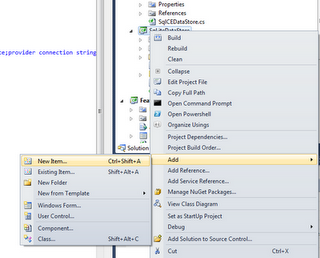
1.  Right click on your project and click on Add New Item

2.   Select the ADO.NET Entity Data Model option from the templates list

3.   Follow the steps on the Entity Data Model Wizard and specify the connection string to your database

4.  Select all database objects you want to include in your model


Posted on January 15, 2015 and filed under Using Entity Framework.

Domestic IT Outsourcing – FAQs


In this first installment of the “Domestic IT Outsourcing” series, we will examine what outsourced IT consulting is, why it’s a valuable resource for companies with IT needs, where to find IT consulting firms, and how they solve temporary IT needs.

What is outsourced IT consulting?

IT consulting is the practice of advising companies on the best use of technology to enhance, automate, or streamline their business operations and/or the development of computer software to meet these demands. When IT consulting is outsourced, the work involved is assigned to a freelance individual or an IT consulting firm, like Extra Nerds. Such entities exist worldwide, but it’s often expensive and inefficient to work with companies in other countries due to differences in time zones, language, culture, currency, or any number of other factors. Domestic IT consulting is the practice of limiting these business relationships to companies and individuals based in the same country. Though this is often more expensive in terms of hourly rates, it’s often less expensive when factoring in the efficiency gains and legal protections. It’s for this reason that many U.S.-based companies are now looking to outsource their IT work to U.S.-based IT consulting firms. In addition, many IT consulting firms based on rural U.S. towns, like Extra Nerds, offer the same quality of service as metropolitan-based IT consulting firms at a fraction of the cost due to the lower cost of living. There is a significant growth in the prevalence and use of rural outsourced IT consulting firms, especially in small college towns across the U.S. where the income level is low compared to the education level. These low-to-medium income areas that are dense with college-educated tech professionals are ideal places to contract with IT consulting freelancers and  firms.

Why is outsourced IT consulting a valuable resource?

Companies with overburdened, understaffed, or ill-equipped IT professionals often have a need to hire freelance software developers to meet their goals. Most IT departments are overburdened with new projects tasked to them by other departments or coming down from the CEO. New software must be created on an ongoing basis in order to remain efficient, take advantage of market opportunities, and integrate with distinct and evolving systems. On top of this, IT departments must continue to support and improve existing software applications. It’s not unusual for an IT department to have a backlog of requested software development, and many of those projects cannot be started until the right staff becomes available to work on the project. Finally, the skills required for work on the project may not be present in-house. If no one in the IT department has experience integrating with Authorize.net, for example, then IT departments must either hire a new developer with experience in online payment systems… or they can outsource this temporary work to a developer with specific experience in the skill set required. The latter is often much cheaper and results in a much higher quality end product in less time.

How do outsourced IT consulting firms meet the needs of companies?

The process of completing a project with an outsourced IT consulting firm is similar to most other contract relationships but with a few important differences. One important difference is the term of the contract. Typically, a contract position for another type of job is based on a number of months (eg. 12-month contract). In software development, contracts are usually framed by a project… a discrete set of requirements (definition of scope) clearly detailing what the final product is expected to be, when it will be delivered, and the price to be paid for the completed project. Other types of IT consulting contracts are those that provide IT consulting services at an hourly rate for support and ongoing maintenance. These are typically open-ended, and the IT consulting firm usually bills their client by the hour or fraction of an hour, sending invoices on a bi-weekly or monthly basis. Another important difference in IT consulting firm contracts is that they usually accompany a very detailed non-disclosure agreement. This is necessary since the consultant will often have access to sensitive company information. Once a contract and non-disclosure agreement are signed, the consulting firm begins working on the project, which is usually broken up into milestones, and provides periodic updates/demos to the client demonstrating their progress and perhaps invoicing for completed work along the way. Once the final product is delivered, the consulting firm can remain available for future updates and/or support as needed. Companies should require of the consultant to provide complete backup of the source code involved as well as documentation on how to use the new software developed. Some companies may be able to take over the support and future development of the software, in which case the consultant is no longer required.

Where can my company find and outsource work to an IT consulting firm?

IT consulting firms are all over. The trick is finding a good one. If you’re new to outsourcing IT work you might start with online freelance marketplaces such as Elance.com, oDesk.com, Freelancer.com, and Guru.com. These services take care of a lot of the headaches involved in outsourcing IT work, such as handling the invoicing and payment as a third party, providing features to communicate with the the consultant, resolving client/contractor disputes, handling currency exchanges, and so on. They provide a pool of IT consultants, each with their own rating based on client reviews. Of course, the traditional methods of searching for IT consultants are also available. Googling “IT consultant Athens OH,” for example, will provide some useful results. And, of course, word-of-mouth recommendations are always a great way to find out about IT consultants recommended by colleagues. Asking contacts in other companies who they use for outsourced IT work could be a great way to find out about IT consultants you didn’t know existed.

Stay tuned for part 2 of the “Domestic IT Consulting” series. In the next installment, we’re going to discuss “Domestic and overseas IT outsourcing,” which will examine the differences between outsourcing IT work to U.S.-based IT firms and outsourcing to common foreign countries, such as India and the United Kingdom.


Posted on January 15, 2015 and filed under Domestic IT Outsourcing.

Common third-party ASP.NET web controls: Grid


This post will review some of the most popular form controls used in ASP.NET development – Grid control.

The biggest problem web developers and designers must tackle is how to display as much data as possible to the user without cluttering up the screen or ruining the design flow. Along with this age-old dilemma, we must now also take into consideration responsive mobile-ready layouts. Today, web users are more demanding than ever; they want eye-catching designs, easy flowing form entry and above all performance. It seems impossible that a user can expect to retrieve a set of 1 million data records in a matter of milliseconds. But, indeed, this is the expectation that we strive to achieve.

Previously, developers could easily display their data using the goo-old ASP.NET GridView control, which did provide us with a good template and the capability to redesign, although it meant coding in much of the navigation like paging, sorting, etc. As time moved on, as it always does, things change. For the web-user experience, things have changed drastically. Grid controls need to be first and foremost fast and easy to navigate. Other features that are popular are grouping, filtering, nested data and ability to add/edit/delete.

Compared to several years ago, we now have so many options. This is far from a complete list, as there are many, many controls available. I have had the opportunity to work with each of these :

1. JQGrid – The Frugal Choice

jqgrid-300x99.jpg

Everyone loves JQuery, and rightfully so, as it helps us achieve rapid application development by not having to recreate the wheel. The JQGrid control is no exception. It is the most popular plugin used for Grid controls. The control is an Ajax-enabled JavaScript control. Since the grid is a client-side solution loading data dynamically through Ajax callbacks, it can be integrated with any server-side technology, including PHP, ASP, Java Servlets, JSP, ColdFusion. JQGrid is licensed under the most permissive and free MIT license or GPL. The JQGrid has great community support. Do a quick search on stackoverflow, and you will find your answer. Because it is based on Jquery, it will pick up your Jquery theme, so it is easy to update your color scheme. Try it yourself: www.trirand.com/blog/?page_id=

2. DevExpress – Similar to GridView

For those who are comfortable with the ASP.NET GridView syntax, the DevExpress Grid will make them feel right at home. This control includes all of the normal bells and whistles and also a built-in printing engine for instant ad-hoc reporting. DevExpress Themes implementation is based on Microsoft’s themes and skins technology. There are many rebuilt themes to choose from, as well as the ability to customize. I felt that making theme customizations was a bit too involved and could be made simpler. Overall, it’s a good product with many features. Demos available here: https://demos.devexpress.com/ASPxGridViewDemos/Default.aspx

3. Telerik – The All-in-One

Telerik offers products ala carte; however it is a better value to purchase the DevCraft bundle, which takes care of many of your needs and also has extra goodies for developers like JustMock, JustTrace. The ASP.NET AJAX RadControls have been around awhile and are used widely, therefore the support and community has a lot to offer. The Grid control boasts all of the required functionality plus a slick look and feel. My experience with support has been very responsive.   Check it out: http://demos.telerik.com/aspnet-ajax/grid/examples/overview/defaultcs.aspx

Kendo UI – HTML5 / Javascript

Kendo UI has paired-up with Telerik to offer .NET MVC, PHP, and JSP wrappers for their web controls along with the pure JavaScript implementations. This makes it a win-win for all developers and needs. With Kendo UI, you can target desktop and mobile devices using the cross-platform power of modern HTML5, CSS3 and JavaScript, while never actually hand-coding HTML/JS. Performance is super fast and flexible. Kendo theming is similar to JQuery, where you can chose pre-selected themes or roll your own, and they’re easily tweaked. Since the server wrappers are fairly new, the support at times has difficulty keeping up with demand but is responsive with great examples. Worth checking out: http://www.kendoui.com/web.aspx

Selecting the appropriate plug-in or product can mean a real savings in development time.

As technology moves forward so must we as developers!


Posted on January 14, 2015 and filed under Other.

WebForms vs. MVC?


As an ASP.NET developer, how do you know whether to pick ASP.NET WebForms over MVC  (Model, Controller, View) when developing new web projects?  I tend to follow these 5 simple rules to help me determine which platform suits me best.

Are you working with a team?
You are only as strong as the weakest link.  The skill level of each team member is an important factor in choosing what development platform to use.  MVC has a steep learning curve involved (Yes! I had to go through these grueling stages as well). And if the majority of your team isn’t comfortable working with MVC, it is probably smarter to choose WebForms.

Data Intensive vs. Rich Client Project
If the web project involves a lot of data, data grids and filtering/sorting/grouping options and maintenance pages, then WebForms is the way to go.  If the web project requires a lot of client-side manipulation and ultimate control over the rendered HTML, I would certainly choose MVC.  Implementing Ajax, JSON and Jquery is a breeze in MVC.

Rapid Application Development
If the project has a tight budget and/or deadline, WebForms has a slight advantage over MVC.  ASP.NET Webforms was created with reusability in mind. The familiar drag and drop controls are very helpful in rapidly creating web pages in a few clicks.  However, you lose control over the rendered HTML and more importantly there is a performance hit with the added VIEWSTATE.

Ultimate control over HTML
One of the main advantages to using MVC over WebForms is complete control over the rendered HTML.  Although you tend to type more when creating the web elements manually, you have complete control on styles, properties, etc.  With WebForms, the HTML is automatically generated for you.  This even gets more complicated when using third-party controls, since they have their own different implementation and rendering.  Although it is possible to create HTML elements manually using repeater controls or data item templates, MVC has a cleaner way of doing so.

Testability
MVC was created with testability in mind.  The MVC pattern has clean separation of concerns and fits well with Test Driven Development.  Although possible, it’s really hard to implement automated testing in WebForms with its coupled behavior and event-based model.

Good luck, and happy coding!


Posted on January 14, 2015 and filed under Other.

Can a WordPress theme be customized?


A common scenario I encounter in my work is when a client picks out WordPress theme, but it’s not exactly what he or she wants. The first question clients have is, “Can it be customized?”

The short answer is, yes, WordPress themes can be customized. How it’s done depends on the clients’ comfort level with coding.

In WordPress, it is the theme that determines how the website will look and behave.  It is not the same as the content that is added to the website after the theme is installed and configured with your customizations.

Within the theme exist several files. The two main files are called index.php and style.css. The index file determines what is displayed and where; and the style.css file determines the colors, sizes and shapes of the theme. Without these two files, the theme would cease to exist. You will also find several other files in the theme folder.

To customize your theme, you will need to access the files and edit the code found on the style sheet and header and index files. At this point, you may or may not feel comfortable editing code. If you do not feel comfortable, contact an expert in WordPress to make the edits for you (Like me. I’m a WordPress Nerd, afterall!).  Be sure the person speaks your native language fluently or you will surely have a very difficult time trying to get them to understand exactly what you want. Websites are designed with pixel perfection. Your WordPress developer should be able to speak your language with that same amount of clarity.

After you have made or had someone make your customizations, you are ready to add content to your website and go live!


Posted on January 14, 2015 and filed under Other.